It's 9:14 on a Friday morning. Your marketplace listing shows one unit of a fast-moving SKU. So does your own storefront. So does the buy-online-pickup-in-store page for your flagship store, because all three were synced from the same count last night.
By 9:40, all three channels have sold it.
One of those orders ships. The other two become cancellation emails, and at least one of those customers does not come back. Nothing malfunctioned. No one ran a bad promotion. Every system did exactly what it was built to do. It just was not built to stop this.
Overselling across channels is the most expensive way to find out your inventory data has a staleness problem. The good news is you can close the oversell window without the blunt fixes: throttling sales, hiding stock you actually have, or splitting inventory into per-channel buckets.
In this blog, I'll cover why oversells happen, what one actually costs and the six moves that prevent them. In short, KIBO keeps one inventory record for every product and location, updates it the moment stock changes, and gives you controls for the cases data alone cannot fix.
Key Takeaways
- Oversells are a data problem, not a demand problem. Two channels sell the same unit because they are reading stale or separate pictures of the same stock, not because you sold too much.
- Three failure patterns cover nearly every cross-channel oversell: the stale-sync window, phantom inventory and the cart-to-commitment gap.
- The root fix is one shared inventory record per product-location that every channel reads. No second copy to go stale, nothing to reconcile.
- Close the remaining gaps with targeted controls: event-driven updates, safety stock where oversell risk is real, cart-level reservations for hot items and segmented pools when channels compete for the same stock.
- Decide the exception path before you need it. Overallocated quantities become pending items that auto-convert when stock arrives, and backorder rules and substitutes beat blunt cancellations.
Why Do Oversells Happen Across Channels?
Most oversells are not a demand problem. They are a data problem. Two channels sold the same unit because they were reading stale or separate pictures of the same stock: a sync that had not run yet, a phantom unit that is not really on the shelf, or the gap between an item sitting in a cart and an item committed to an order. Fix the data flow and sales volume can stay exactly where it is.
Three failure patterns cover nearly every cross-channel oversell:
- The stale-sync window. If inventory counts move on a schedule, like a nightly export from the ERP or an hourly push to each channel, every channel is selling against a snapshot that starts aging the moment it lands. A 2 a.m. sync means this morning's shoppers are buying against last night's truth. The oversell window stays open for exactly as long as the snapshot is stale.
- Phantom inventory. The record says one unit. The shelf says zero. Think shrinkage, damage, a miscount, a return that never got restocked, or a unit that left the back room on a "quick borrow." Phantom units are physical errors. A faster sync cannot fix them, because the data is not late, it is wrong. (We cover how to present what's actually sellable in How to Present Accurate Inventory on the Storefront.)
- The cart-to-commitment gap. A shopper on channel A puts the last unit in a cart at 9:15 and keeps browsing. A shopper on channel B checks out at 9:16. The first shopper checks out at 9:18. If nothing reserves stock between "add to cart" and "place order," the fastest cart wins and the slower one oversells, even with perfectly real-time data.
A fourth accelerant is worth naming: per-channel inventory records. Some architectures push a slice of stock to each channel so the channels cannot oversell each other. It works, but now the channels cannot help each other either. That trades visible oversells for invisible undersells, and undersells are missed revenue nobody emails you about.
What Does One Oversold Order Actually Cost?
An oversold order costs far more than the refund. You pay in payment-processing fees that do not come back, a customer service contact, labor and shipping already spent, and acquisition spend on a conversion you then cancel. Most expensive of all, you pay in a burned customer whose lifetime value walks out the door.
| Cost layer | What you actually pay |
| Refund and payment reversal | The refund is revenue you never banked, and transaction fees often are not returned |
| Customer service contact | An agent handles the apology, the refund, and often a retention offer |
| Labor and shipping already spent | If the order was picked before the oversell surfaced, that work and any label cost is sunk |
| Wasted acquisition | The paid click that "converted" is now a cancellation, so you paid for it twice |
| Churn | The customer you burned, and their lifetime value, leave |
| Reputation | Cancellation emails get screenshotted. Reviews and social posts compound the damage |
No single line item ends the business. The problem is that oversells cluster. They spike at peak, on promoted items, exactly when volume outruns your data. That is when the cost table stops being a rounding error.
How Do You Stop Overselling Without Slowing Sales Down?
The prevention playbook is six moves: one shared inventory record, event-driven updates, targeted safety stock, cart-level reservations, segmented pools for competing channels and a pre-decided exception path. Together they close the stale-sync window, quarantine phantom units and bridge the cart-to-commitment gap, while every real unit stays visible to every channel.
1. Keep one inventory record per product, per location
This is the root fix for stale and split data: a single authoritative record for every product-location combination, which every channel reads. In KIBO, inventory lives at the product-and-location level as the single source of truth. The record the order management system allocates from is the record the storefront displays. There is no second copy to go stale.

2. Make updates event-driven, not scheduled
Inventory quantities should change when stock is claimed or released. An order allocates units. A cancellation or a return releases them. Neither waits for the next export job. A cancellation at 9:15 returns the unit to the sellable pool at 9:15, where the next shopper can see it.
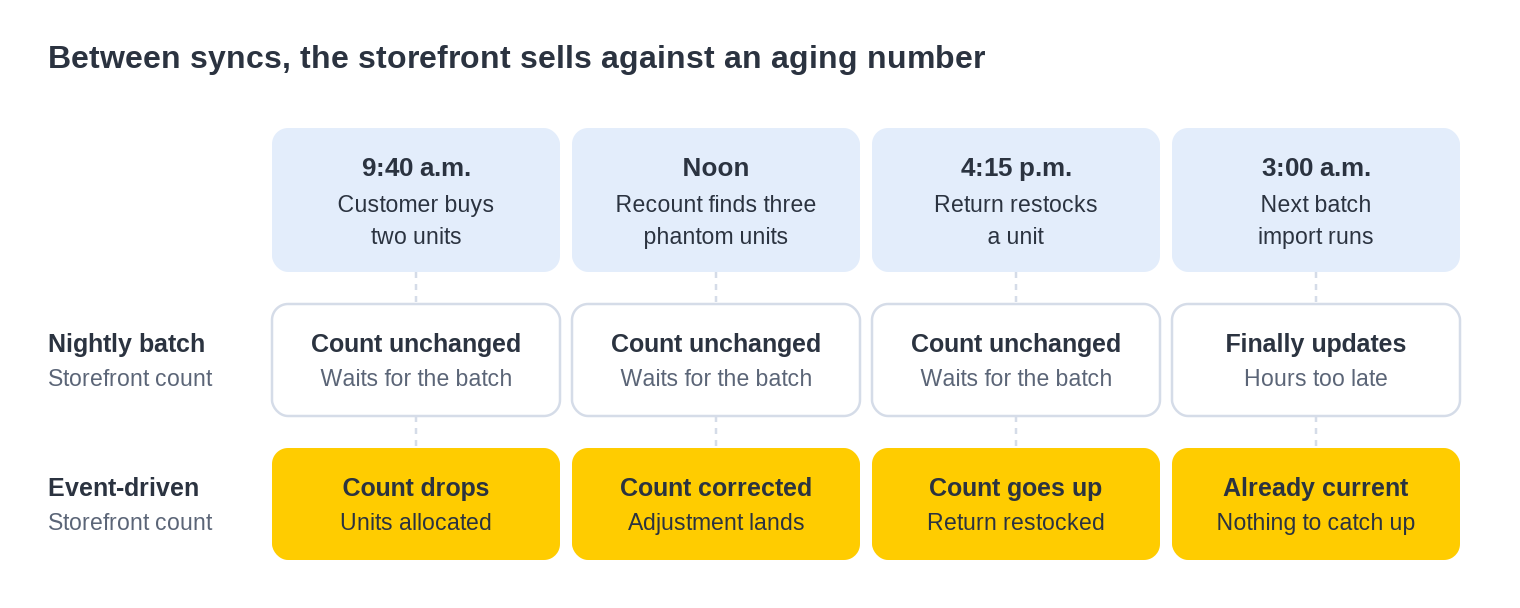
(We contrast batch and event-driven sync in detail in Inventory Order Management: Accuracy, Visibility, and Promising.)

3. Set safety stock where oversell risk is real
Safety stock is a buffer deliberately withheld from the sellable quantity, set per product and location. It protects you against the errors a sync cannot fix: a miscounted shelf, a demand spike, a fulfillment delay. The key word is deliberate. Tune the cushion on the items where an oversell hurts instead of taking a global haircut that hides sellable stock everywhere.
4. Reserve inventory in cart for your hottest items
For drops, tickets and one-of-a-kind units, the cart-to-commitment gap is the oversell. KIBO can reserve inventory the moment it enters a shopper's cart and hold it for a configured window. The reserved stock is committed if the shopper checks out and automatically returned to the pool if they abandon. What is in a cart is guaranteed to be purchasable.
5. Ring-fence pools when channels compete
Sometimes the problem is not that channels oversell each other. It is that one channel drains the pool another channel needs. Inventory segmentation reserves a percentage or a fixed quantity of available stock for a specific channel, customer group or fulfillment type. Hold 20% of a promoted SKU for your VIP segment, for example, so a marketplace promotion cannot starve the storefront that made the product popular.
6. Decide, in advance, what happens when you still oversell
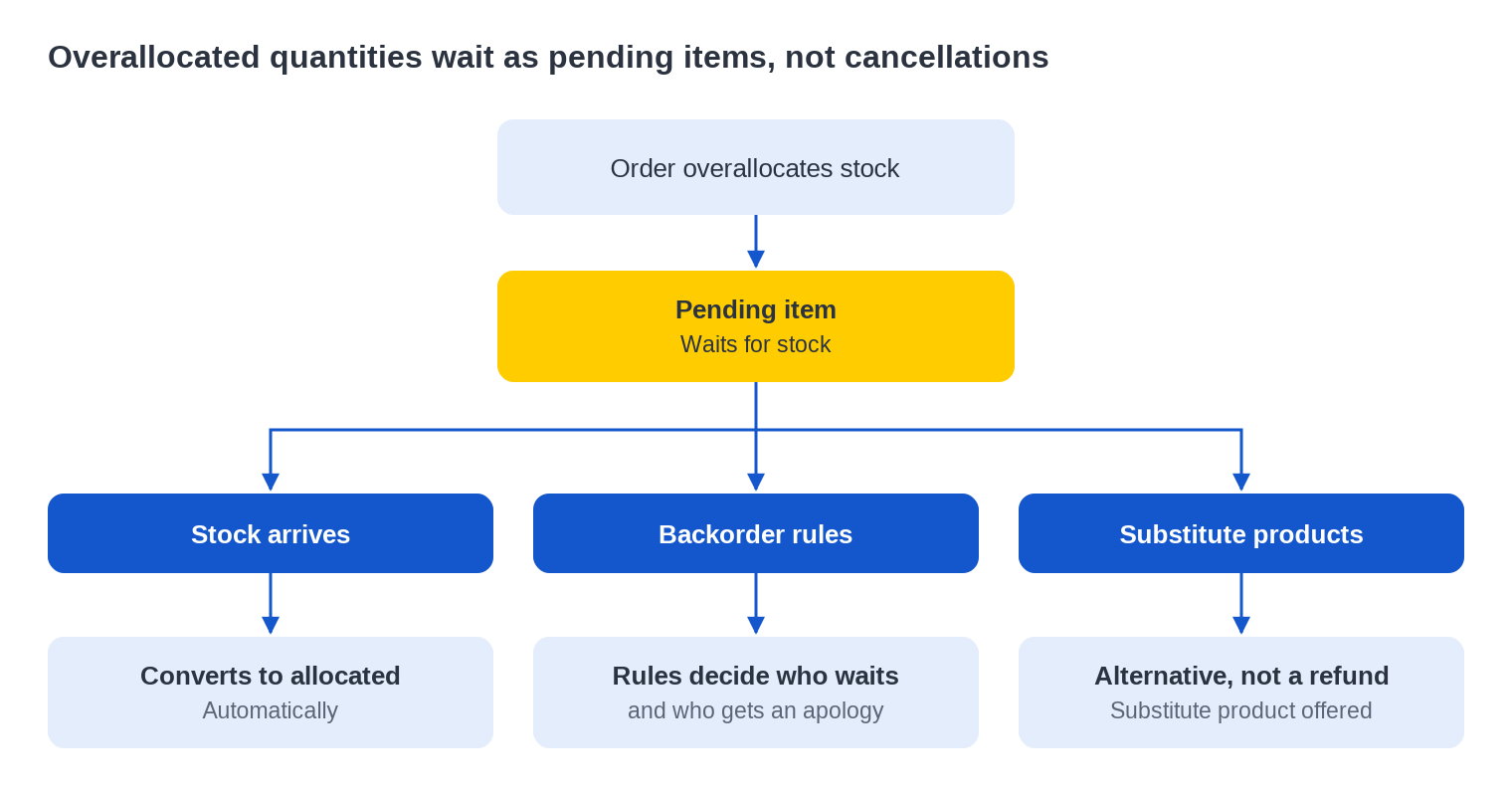
Data hygiene reduces oversells. It does not repeal demand spikes or shrinkage. Configure the exception path before you need it. Overallocated quantities become pending items that automatically convert to allocated the moment stock arrives. Backorder rules decide who waits and who gets an apology. Substitute products give the shopper an alternative instead of a refund. (You can even oversell on purpose: an "assume infinite inventory" flag exists for made-to-order items where availability was never physical.)
Where KIBO Fits
KIBO treats inventory as one authoritative record per product and location, and serves availability to every channel through a dedicated Real-Time Inventory Service built for storefront traffic. In-stock and out-of-stock status updates instantaneously on search, category and product pages. Every channel stops selling the moment the last unit is claimed, and starts again the moment one is released.
For the broader argument on why inventory accuracy is the foundation everything else in order management sits on, see Inventory Is What Makes or Breaks Your OMS.
Related reading: One OMS for Every Order: What Distributed Order Management Demands and Where KIBO Leads and Your Omnichannel Strategy is Only as Good as Your Inventory Visibility.
The common thread is one inventory truth. When every channel reads the same record and that record changes the moment stock does, overselling stops being a cost of growth, and sales volume can keep climbing.
Frequently Asked Questions
What's the difference between overselling and underselling?
Overselling is promising stock you do not have. It shows up as cancellations. Underselling is hiding stock you do have. It shows up as nothing, which is the problem. Both usually come from the same root cause: stale or split inventory data, patched with buffers and per-channel slices.
Should I just pad my inventory counts to stop overselling?
No. Padding converts visible oversells into invisible missed sales, and the buffers only grow over time because nobody wants to be the one who removes them. Set safety stock deliberately per product-location instead, so the cushion is sized to actual risk and visible to planners.
Does real-time inventory slow the storefront down?
No. In KIBO, availability is served by a dedicated Real-Time Inventory Service, separate from the catalog APIs, engineered for the traffic loads of search results, category pages and product pages.
Ready to stop selling units you don't have? See how KIBO's real-time inventory keeps every channel promising from one pool of truth.